

Scan schedule
CAD runs three scan tiers on a recurring basis:
All scanning is non-intrusive. Newly discovered assets are automatically added to your Assets inventory.
Recon types
Domain Recon
DNS enumeration, HTTP probing, and TLS inspection on domains and subdomains. Identifies web servers, WAFs, certificates, and technologies in use.
Network Recon
Scans the full port range (65,535 ports) on IP addresses. Identifies open ports, running services, and version information. For certain services, Odin uses targeted probing to extract detailed configuration.
Recon results
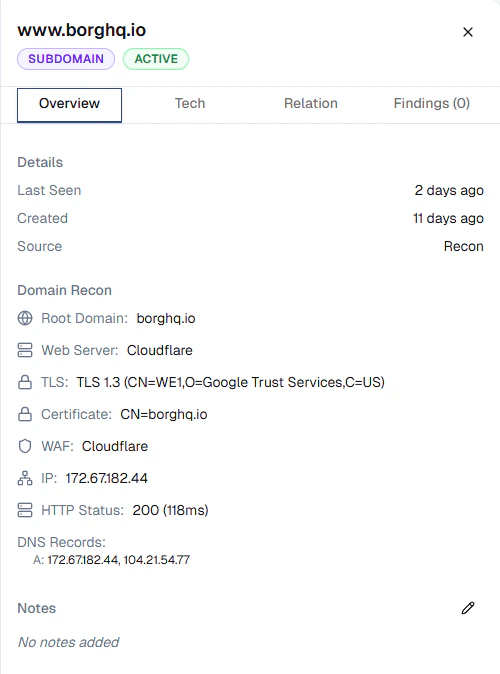
Recon data is available on each asset’s detail page. Click any asset on the Assets page to view its results. For domains and subdomains, Domain Recon surfaces:- Web server: the detected web server (e.g. Cloudflare, Nginx)
- TLS: protocol version and cipher details (e.g. TLS 1.3)
- Certificate: certificate subject and issuer
- WAF: detected web application firewall
- IP: resolved IP address
- HTTP status: response code and latency
- DNS records: A, AAAA, CNAME, and other resolved records
Turning monitoring on or off
Continuous monitoring is controlled for your whole organisation from the Continuous monitoring card under Billing → Credits. Admins can switch it on or off at any time:- On — CAD runs on your schedule and is billed at 4 credits per monitored asset per month, prorated daily.
- Off — all scanning stops and no CAD credits are charged. Your discovered assets are preserved in your Assets inventory; turning monitoring back on resumes it.
CAD is billed from your plan’s credits. Visit Billing in the sidebar to review usage, or contact [email protected] to discuss your plan.