

Engine findings
Some pentest runs report issues as engine findings — the source report from the run, shown alongside client tickets. Engine findings are read-only until you promote them. Promote to ticket creates a normal Odin finding with an organisation identifier (for exampleBORG-12) so you can assign it, change status, discuss it, and push it to Linear, Jira, GitHub, or GitLab. The engine report stays as the source; workflow lives on the ticket.
After you promote, lists show the ticket instead of the engine row. Opening the previous engine id still resolves to that ticket. Unpromoted engine findings cannot have their status or assignee changed, and cannot be pushed to an issue tracker, until they are promoted.
The ticket carries the report write-up (summary, description, impact, details, remediation, and affected assets). Extra engine planes such as live/code evidence stay on the engine report, not on the ticket.
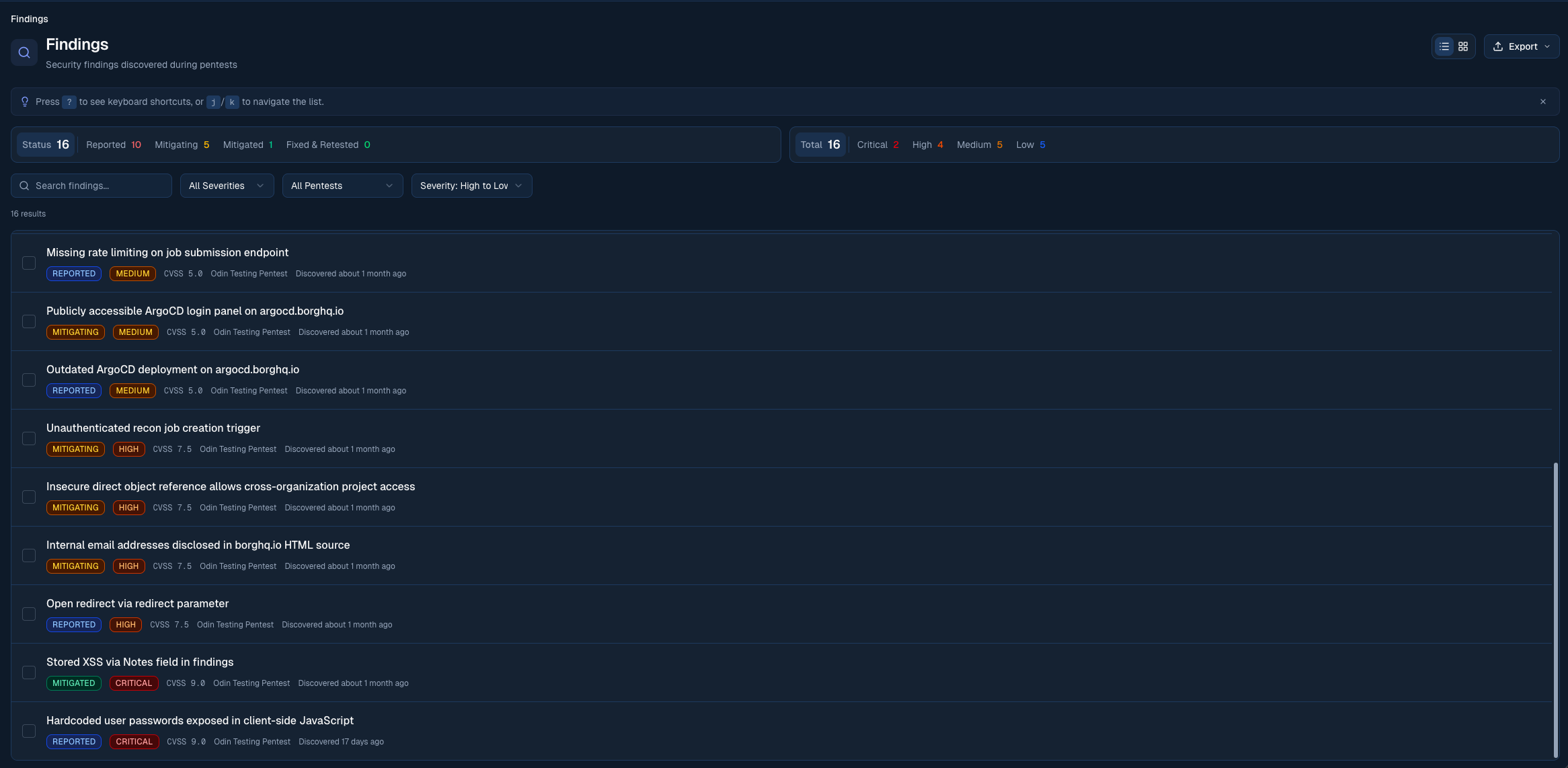
The Findings view shows all security issues across your workspace, sorted by severity
Severity levels
Each finding gets a severity based on exploitability and impact. Severity is set by Borg’s analyst team or by Odin’s AI pentest, and is anchored to a CVSS base score:
Lists, board cards, and the severity filter show this as a compact mark: a red warning triangle for Critical, and the three-bar signal for High through Info.
Click a severity in the stats bar at the top of the Findings page to filter to it.
Confirmation type
AI pentest findings carry a confirmation type alongside their severity. Severity is how serious the issue is. Confirmation type is how Odin established it was real, and how much evidence sits behind it.
The confirmation type is available in the finding detail view and filters. It is not shown on list rows, keeping the queue focused on priority and ownership. Findings our analyst team raises by hand don’t carry a confirmation type, so it only applies to AI pentest findings.
Finding status
Each finding moves through a status lifecycle that captures the back-and-forth between your team and Borg as a fix is applied and verified:
List groups, board columns, and status filters use a square workflow mark: empty at Reported, a single line across the top while Fixing, halfway around (top and right) at Needs Revision, three sides at Open for Retest, a hollow square at Risk accepted, and a completed square with a tick at Fixed & Retested. The colours match Home: amber for Fixing and orange for Needs Revision.
Changing the status
Member, Admin, and Owner roles can move a finding between client-controlled states from the Status property in the finding’s side panel, by right-clicking a list row or board card, or by dragging a card between columns on the board:- Reported → Start fixing, or Accept risk
- Risk accepted → Resume fixing
- Fixing → Submit for retest, or Accept risk
- Open for Retest → Reopen as Fixing, or Accept risk
- Needs Revision → Resume fixing, or Submit for retest
Assigning findings
Assign a finding to a teammate so it’s clear who owns getting it fixed — the same way you’d assign an issue in Linear or Jira.- In the Findings list, each row shows the assignee’s avatar just before the finding’s age. Click the avatar — or the dashed placeholder on an unassigned finding — to pick an assignee inline, without opening the finding. You can also assign from the right-click menu on a list row or board card.
- Inside a finding, use the Assignee property in the side panel to assign, reassign, or clear.
Following findings
Follow a finding to get notified about its updates, independent of whether you’re assigned to it.- Inside a finding, click the bell at the top of the side panel. It rings while you follow the finding, and its label says how many people do. If you’re the assignee, the bell stays on: assignees always follow their findings.
- Following a finding means you get notified about updates to it — status changes, comments, and other activity — through the Alert Centre.
- When a finding is reported, your organisation’s default finding subscribers are subscribed automatically — every non-Read only member, unless your organisation has customised the list. If the delivery includes a Critical finding, those default subscribers are also emailed.
- Interacting with a finding subscribes you too: changing its status, commenting, being
@mentioned, or being assigned. - Assignees always follow the findings assigned to them and can’t unfollow while the assignment stands — unassign first if you want to stop following.
Finding identifiers and PR linking
Every finding has a unique, human-readable identifier made from your organisation’s finding prefix and a sequence number — for exampleBORG-12. Preview findings from the free Micro Pentest use the same sequence. The identifier is shown above the finding’s title and on every list view, and it’s how findings get connected to your engineering work.
When the GitHub integration is connected, referencing that identifier from a pull request — in the branch name, title, or body — links the PR to the finding automatically. You can also link one by hand. Linked PRs show in the finding’s Links section and track their open, merged, or closed state live.
Linking a fix is also the trigger for verifying it: once a linked PR merges, Odin can review the change and confirm whether the finding is resolved, moving it to Fixed & Retested or Needs Revision without a manual retest step.
Automatic retests
How to link a pull request to a finding — three ways — and how Odin verifies the fix when it merges
What’s inside a finding
The write-up reads down the left of a finding; the side panel on the right holds its properties, links, and discussion. On a narrow screen the side panel stacks under the title instead. Press Escape to close the finding. On a wide screen the list stays open beside the finding, with the filters above it, so you can see where you are and click another finding without closing the one you have open. The open finding is highlighted in the list. Where the list is narrow, each finding takes two lines: its identifier, status and age, then the title. On a laptop-sized screen the finding takes the whole page instead. Either way, press j for the next finding and k for the previous one, or use the arrows at the top of the side panel. Under the title, one line sums the finding up: its severity, the weakness, and how it was confirmed — for example High · Broken access control · Found in code, medium confidence. The side panel lists the finding’s properties:- Status: where the finding is in the lifecycle. Members and above change it from here
- Assignee: who owns the fix (see Assigning findings)
- Priority: for organisations with Intelligence, the finding’s priority band and the main reason for it. Click it to see every reason and what the finding affects
- Severity: the severity label and CVSS score. Check incomplete means the automatic severity check did not complete for this finding
- Service: for organisations with Intelligence, the service the finding lives in
- Repository: the repository the code is in, which opens in a new tab
- Asset: the domains, hosts or endpoints where the issue applies. Where there are several, click the count to see them all. Assets Odin already tracks link through to the attack surface
- Weakness: the weakness class and its CWE identifier
- Pentest and Found: where and when the finding was reported, how long ago that was, and its revision once it has been revised
- Link a pull request by hand, or change the linked ones with Edit linked pull requests. Without the GitHub integration, Links offers to connect it instead
- Create an issue in each connected tracker that doesn’t have one for the finding yet
- Remove a linked issue with its ×
- Description: what the vulnerability is
- Impact: the business consequence if it were exploited
- Details: technical details, including how the issue was identified
- Remediation: step-by-step fix guidance
- Proof of Concept: for AI pentest findings, the request/response evidence captured during exploitation
- Code Reference: for AI pentest findings with a code pointer, the exact file and line in your repository
Draft a fix
Where fix drafting is enabled for your organisation, Members and above see Draft a fix at the top of a finding about code that is still waiting for a fix (Reported, Fixing or Needs Revision) and has a linked repository, or a linked GitHub pull request to take the repository from. Odin opens a draft pull request on that repository for you to review; nothing is merged for you. Before anything starts, Odin shows the repository, branch, and commit it will work from, and how it is billed. When a finding about code has no repository linked, the same place offers Link a repository: choose the repository the code lives in, and Odin drafts the fix there. Findings that aren’t about code, such as a misconfigured web server, don’t offer either. Fixes are drafted in GitHub repositories. A finding about code from a Bitbucket or Azure DevOps repository doesn’t offer Draft a fix yet. Findings Odin’s engine reported but nobody has promoted yet show Not tracked as their status and offer Promote to ticket in the same place. Promoting one gives it a status, an assignee, and a discussion.Revisions
Findings are immutable. Whenever Borg’s analyst team or Odin’s AI pentest updates the content of a finding (after retesting, for example), a new revision is created. From the second revision onward the Found property shows the revision number. You always see the current revision, but the full history is preserved on Borg’s side for audit.Views
Open Display in the toolbar to choose how findings are shown: the view, the order, and how the list is grouped.- List: the default view. Each finding is one line: severity, identifier, title, assignee, and age (hover the age for the full date). A row also shows a message count when the finding has a discussion, and the service it belongs to when your findings span more than one service. Rows are grouped by the remediation workflow unless you change the grouping under Display. Right-click a finding row for quick status changes, assignee, copy, follow, and linked-resource actions; right-click a group header to collapse it, act on the group, or hide it. Each group header shows its full count under your current filters. Findings load in group order, a page at a time; partially loaded groups show how many findings remain, and Load more fetches the next page. Open for Retest, Risk accepted, and Fixed & Retested start collapsed with their counts — press the arrow on the group header to reveal them.
- Board: findings grouped into status columns, each with that status’s workflow mark. Each card shows the severity, identifier, assignee, title, age, and message count. Drag a card onto another column to update its status. The card stays in the destination column after the update. Columns you cannot move a finding into (Reported, Needs Revision, and Fixed & Retested) do not accept the drop — those states are set by Borg. Column titles show their full count under your current filters, including cards that have not loaded. Hidden columns fold into a narrow strip that keeps their count; press Show or Hide next to the column title to reveal or collapse them.
Filtering and search
Filters at the top of the page narrow your view. Open the filter button to browse the grouped menu:- Saved views: quickly switch to My queue, Needs attention, Waiting on Borg, or Accepted risk. The view in use is ticked; choose it again to turn it off. You can also save the current filter set as a named view.
- Severity: select one or more of Critical, High, Medium, Low, or Info. The menu keeps the priority signal visible beside each count.
- Status: filter by Reported, Fixing, Needs Revision, Open for Retest, Fixed & Retested, or Risk accepted. The counts stay visible even when Fixed & Retested or Risk accepted are collapsed by default.
- Hidden groups: groups hidden from the List view are remembered per organisation in this browser. Open the filters menu and use Hidden groups to restore one group or all hidden groups.
- Assignee: filter to one or more teammates, or to unassigned findings.
- More filters: access confirmation type, pentest, asset, and repository filters without crowding the primary menu.
- Search: free-text search across titles and identifiers
- Clear filters: appears at the bottom of the menu while any filter is on, and removes them all in one step. Your chosen order and any open finding stay as they are.
Bulk operations
Select multiple findings with the row checkboxes, or navigate withj/k and toggle selection with x. You can also right-click a finding row and use its quick status or assignee actions. With a selection active, a bulk action bar appears above the findings list:
- Update status — move all selected findings to Fixing or Open for Retest
- Copy for Agent — copy a single prompt covering every selected finding, formatted to hand straight to a coding agent. A toast confirms how many findings were copied.
- Export — download the selected findings as CSV, CSV (summary), Markdown, or JSON
Bulk operations require the Member role or higher.
Discussion and activity
The discussion sits under the finding’s properties in the side panel, with two tabs. A finding nobody has discussed yet shows only a comment box; once there are messages, they appear above it. The side panel grows with the screen; drag its edge to set the width yourself, and double-click the edge to let it size itself again.- Discussion: a threaded conversation with Borg’s analyst team. Use
@to mention a teammate, attach files, and resolve threads when a question is settled. You can edit or delete your own messages from the message’s menu; an edited message is labelled accordingly. The thread updates live, so replies from the Borg team appear as they are posted without reloading the page. New replies can trigger email notifications based on your discussion preferences. Odin remembers what you have read. A finding with messages you have not seen shows a dot beside its message count in the findings list, and a dot on the Discussion tab while you are on Activity. When you open the discussion, new messages are marked with a new divider for the rest of your visit, and then count as read. Your own messages never count as unread, and what you read does not change what your teammates see as unread. - Activity: a chronological feed of every status change, revision, and integration sync for the finding
Mentioning teammates, findings and projects
Typing@ in a discussion opens a search grouped into People, Findings, and Projects (pentests). Start typing a name, finding title or identifier, or project name to filter each group.
- People mentions notify the teammate, as they always have.
- Findings and Projects mentions are links only and notify no one. A mentioned finding shows as a chip with its current status and severity, and a mentioned project links through to its findings.
Exporting findings
Click Export in the page header to download your current filtered view. The export respects every active filter, so narrow down by severity, status, and the rest before exporting.
Findings you’ve pushed to an issue tracker carry their linked issues into the export:
- CSV and CSV (summary) gain two columns after Status: Linked Issue References, which lists each issue by tracker and identifier (for example
GitHub #42orLinear ODIN-1272), and Linked Issue URLs. Where a finding has more than one linked issue, they’re separated by semicolons. These columns appear only when at least one finding in the export has a linked issue. - Markdown adds a Linked Issues line to each finding that has one, with every issue linking back to the tracker.
- JSON includes a
linkedIssueReferencesarray on each finding, recording the provider, identifier, URL, and provider-specific detail such as the repository or project.
From a single finding
Open the finding’s ⋯ menu:- Copy link — copy a shareable URL that opens this finding directly
- Copy Markdown — copy the finding as Markdown
- Copy for Agent — copy a prompt describing the finding to hand to a coding agent
- Copy branch name — copy a
fix/…branch name derived from the finding - Download Markdown — save the finding as a Markdown file
Pushing findings to your issue tracker
If you’ve connected Linear, Jira, GitHub, or GitLab, you can push any finding directly to your issue tracker from its Links section. The finding title, severity, description, impact, and remediation are all included, plus a deep link back to the finding in Odin. You can also enable auto-ticketing so that issues are created automatically as new findings are reported.Shortcut is also supported, but only through auto-ticketing or a bulk sync. There’s no one-click push for a single finding.
Set up integrations
Connect Linear, Jira, GitHub, or GitLab
Step-up verification
Some actions require re-authentication