

0. Accept terms of service
The first time your organisation uses Odin, an Owner must review and accept the platform agreements: the Master Services Agreement, the Data Processing Agreement, and the AI Services Addendum. This is a one-time step for the whole organisation. Non-Owner members see a notice until this is done. See Terms of Service for details.1. Complete your profile
Click your avatar in the top-right corner and select Profile. Add your name and a photo. This helps your team identify who made changes and who’s responsible for which findings.2. Explore your attack surface
Go to Attack Surface > Assets in the sidebar. This page lists everything Odin has discovered about your organisation’s internet-facing footprint: domains, subdomains, IPs, and APIs.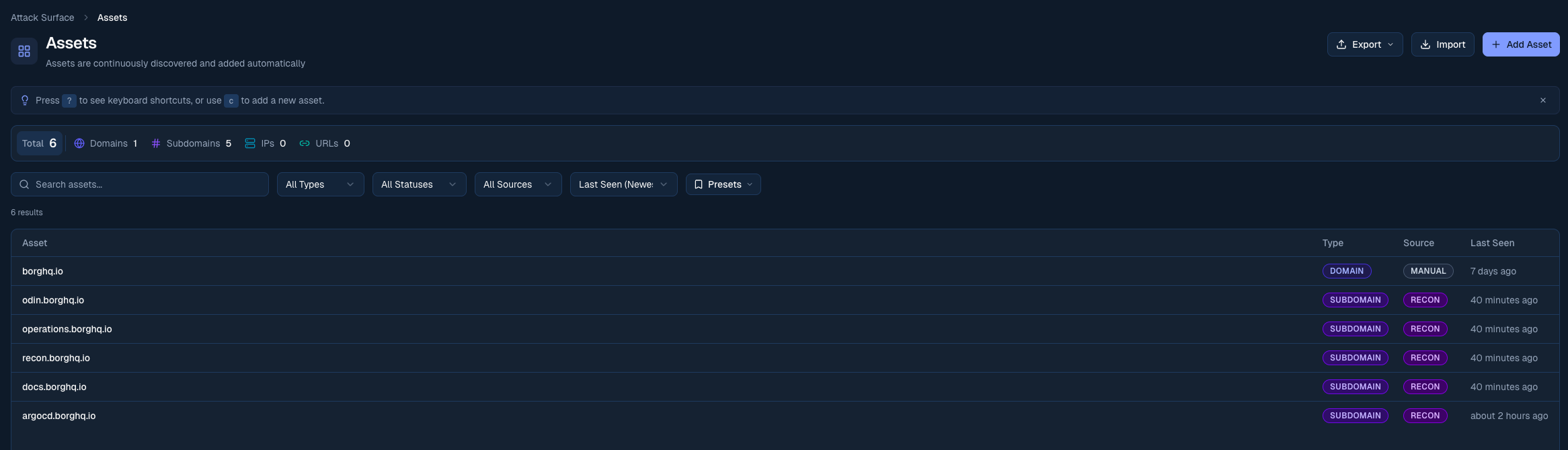
The Assets view shows your organisation's discovered internet-facing footprint
3. Review your findings
Open Findings in the sidebar. Findings are security issues from your assets and pentest runs, sorted by severity. To fix findings from your editor, connect Cursor, VS Code, Claude or Codex with the Odin MCP server.4. Connect your integrations
Go to Management > Integrations to connect your issue tracker. Odin supports Linear, Jira, GitHub, and GitLab. Once connected, findings can be pushed directly to your engineering workflow with one click.
Linear
Push findings to Linear

Jira
Push findings to Jira
GitHub
Push findings to GitHub Issues
GitLab
Push findings to GitLab Issues
5. Turn on PR reviews
Go to Testing > PR Reviews and enable reviews for the repositories you care about. To run a full AI pentest, go to Testing > Agentic whitebox. Launch is enabled by the Borg team: use Contact the team about agentic whitebox testing to open Live Support if you do not have it yet.Set up PR reviews
Read the PR review guide