

Continuous Asset Discovery (CAD) automatically finds and monitors your external attack surface around the clock. Enable it on your root domains and IPs, and Odin discovers subdomains, open ports, running services, and linked infrastructure - keeping your asset inventory current as your environment changes. As your organisation grows, new subdomains, services, and infrastructure appear regularly. CAD picks these up automatically, so your security team always has a complete picture without coordinating across teams or manually importing every asset.Documentation Index
Fetch the complete documentation index at: https://docs.borghq.io/llms.txt
Use this file to discover all available pages before exploring further.
Scan schedule
CAD runs three scan tiers on a recurring basis:| Tier | Frequency | What it does |
|---|---|---|
| Hourly | Every hour | Light DNS enumeration to discover new domains and subdomains |
| Trihoral | Every 3 hours | Advanced enumeration techniques for deeper domain and subdomain discovery |
| Daily | Once per day | Full port scan across all 65,535 ports, IP address linking, and service labeling |
Recon types
Domain Recon
Runs DNS enumeration, HTTP probing, and TLS inspection on domains and subdomains. Identifies web servers, WAFs, certificates, and technologies in use.
Network Recon
Scans the full port range (65,535 ports) on IP addresses. Identifies open ports, running services, and their versions. For certain services, Odin uses targeted probing to extract detailed version and configuration information.
Recon results
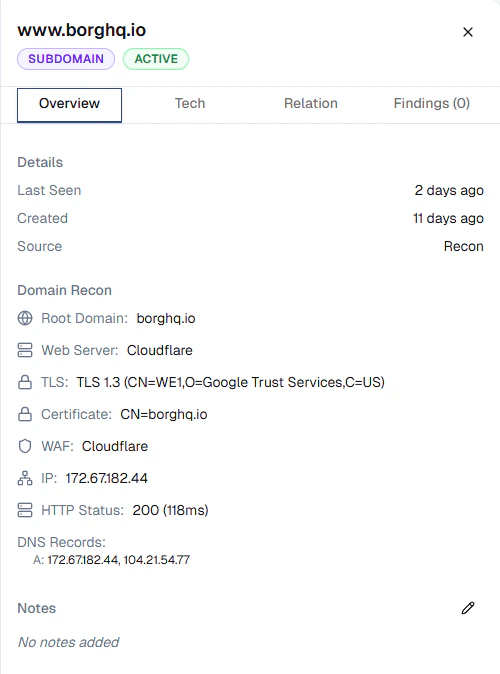
Recon data is available on each asset’s detail page. Click any asset on the Assets page to view its results. For domains and subdomains, Domain Recon surfaces:- Web server - the detected web server (e.g. Cloudflare, Nginx)
- TLS - protocol version and cipher details (e.g. TLS 1.3)
- Certificate - certificate subject and issuer
- WAF - detected web application firewall
- IP - resolved IP address
- HTTP status - response code and latency
- DNS records - A, AAAA, CNAME, and other resolved records
Configuration
CAD runs only on assets you explicitly enable it for. When adding a domain or IP on the Assets page, toggle Continuous Asset Discovery on to start monitoring. You can disable CAD on any asset at any time - scanning stops immediately for that asset.
CAD is a paid add-on billed per root domain. You can toggle it on individual assets at any time, but it must first be activated on your subscription. Visit Billing in the sidebar or contact [email protected] to get started.